 |
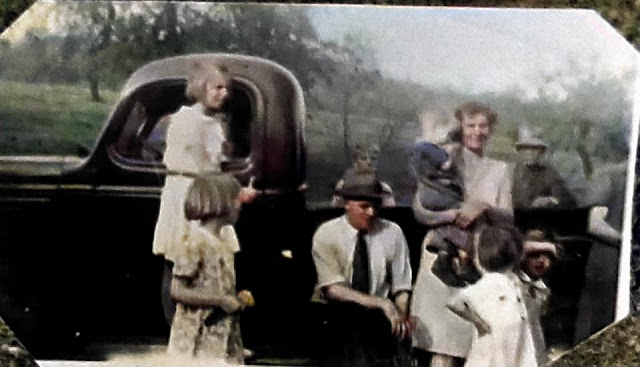
One of my favorite photos of Grandma and Mom, at Grandma's parents' home in West Leisenring, Pennsylvania—made even more beautiful after colorization on MyHeritage.1
|
by Nancy Gilbride Casey
I began to scan more of the photo gifts from my cousin, but quickly got sidetracked by trying to digitally repair some of them.
Take what were already some pretty terrific photos and add some fun and fabulous digital photo tools to repair and colorize them...I think I'm in love!
The photo above nearly took my breath away. I have always loved this photo, as my grandmother Margaret's face clearly shows her joy as she holds my then months-old mom. And now with colorization to see what I have always imagined this scene would look like, with the valley below, and green trees and the flowers in the yard, the pretty dress Grandma is wearing...Wow! is all I can say.
There are all sorts of photo apps available today to fix, colorize and yes, even animate your photos. The tools I used were on MyHeritage, a site much like Ancestry where one can build a family tree, research records on family history, etc. MyHeritage has been building a pretty impressive suite of digital photo tools in the past few years, to help users who upload their old family photos to their family tree sites. I had not had a subscription until recently, and had never tried the tools before. And now, you might not be able to get me to stop!
In the past I've used PhotoMyne and FilmBox apps for my Android phone. PhotoMyne will scan and digitize photos right on to a phone in a split second. FilmBox allows you to scan negatives into photos. The images below were made from a tiny negative about 1-1/2" x 2" scanned and colorized on my phone with FilmBox. Turns out it was my Uncle Buck's family.
 |
| Scan from negative... |
 |
...and colorized.2
|
Colorization is available on both apps and they are free for both Android and Apple.
So, should the mood strike, there are plenty of opportunities to enhance your own photos with these and other apps.
More family photos to come.
Until next time...
NOTES
1 Margaret Simonik Kozlina holding Anna Margaret Kozline, about 1938, West Leisenring, Pennsylvania, unidentified photographer; private collection of N. Casey [address for private use], Tioga, TX, 2022.
2 Family of Donald Firestone, undated photo, unidentified photographer and location; negative in private collection of R. Firestone [address for private use], 2022.
Comments
Post a Comment